
Flying Car Simulator Unblocked — Play Free Online
More Driving and Sports games

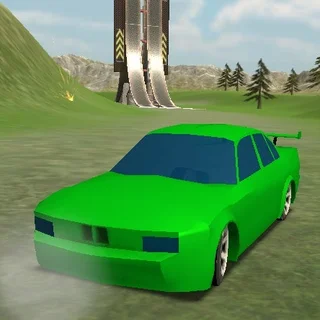



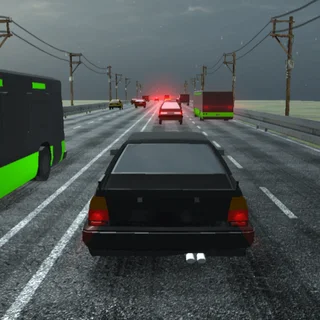





Flying Car Simulator unblocked: play Flying Car Simulator online free right here in your browser — no download, no sign-up, works on a school Chromebook.
What is Flying Car Simulator?
Flying Car Simulator is a 3D driving game developed by Blue Axis and released in June 2019. The game puts you behind the wheel of a versatile sports car capable of driving along city avenues and transforming into an aircraft at full speed. Instead of confining your runs to asphalt tracks, the game allows you to soar directly over urban skylines and explore open airspace before touching down on distant streets. You can jump straight into the driver seat directly in your web browser with no downloads or installation required.
Key features
- Dual travel modes: Switch instantly between street-level asphalt driving and airborne navigation above the city.
- Nitro boost system: Engage rocket propulsion to gain rapid forward momentum along straight roads or during steep vertical climbs.
- Open urban environment: Roam freely across city streets, elevated ramps, and wide airspace without rigid track borders.
- Responsive braking: Use standard braking and handbrake control to manage drift angles and slow down for precise landings.
- Browser-based 3D engine: Runs smoothly inside desktop web browsers without extra setup.
How to play
- Accelerate forward from the city streets using W or the up arrow key.
- Build forward momentum along straight avenues and hold Shift to engage your nitro boost.
- Press F once you reach cruising speed to deploy your wings and lift off into the sky.
- Steer through the air with A and D, adjusting your altitude and pitch with W and S.
- Align your vehicle with an open road or clear rooftop and press F again to retract wings for a smooth landing.
- Tap Spacebar upon touching the pavement to shed excess velocity and bring the car to a safe stop.
Controls
| Action | Keyboard |
|---|---|
| Drive forward / Pitch downward | W or Up Arrow |
| Reverse / Brake / Pitch upward | S or Down Arrow |
| Steer left / Bank left | A or Left Arrow |
| Steer right / Bank right | D or Right Arrow |
| Toggle flight mode / Deploy wings | F |
| Nitro boost | Shift |
| Handbrake | Spacebar |
Flight transition and speed control
Mastering Flying Car Simulator centers on managing the shift between ground traction and airborne flight. Driving along the ground behaves like traditional arcade racing, where maintaining a straight line lets you build up top speed. When you press F, the car deploys lateral wings and transitions physics from tire grip to aerodynamic lift. Pulling up too early without enough ground speed can cause the vehicle to stall or clip low street lamps, so building initial velocity is essential.
Once airborne, handling shifts to flight controls. Pitching the nose downward builds speed while descending, whereas pulling upward trades momentum for altitude. Using the nitro boost in midair provides immediate thrust, which is particularly useful when climbing above tall skyscrapers or recovering from steep dives. Landing requires steady alignment: reduce your descent angle, level the wings, and press F just above the asphalt so the wheels touch down smoothly.
Tips and strategy
- Gain speed before takeoff: Accelerate down a straight boulevard before pressing F so you achieve enough immediate lift to clear nearby street obstacles.
- Save nitro for steep climbs: Hold Shift when pulling upward to gain altitude rapidly instead of depleting boost right before sharp turns.
- Line up straight landing approaches: Position the car parallel with wide highways well ahead of time to avoid sliding sideways into roadside barriers.
- Use gentle steering inputs in midair: Tap steering keys lightly while flying to keep flight paths stable between high-rise buildings.
- Tap the handbrake after touchdown: Press Spacebar immediately upon landing on pavement to stop rapidly without spinning out of control.
Versions and similar games
Flying Car Simulator delivers an open 3D driving and flight playground on Tomb of the Mask. If you enjoy quick navigation and reflex challenges, you can also explore several companion titles on the site. Tomb of the Mask offers fast-paced maze traversal with vertical wall-sliding action. Tunnel Rush tests high-speed dodging through colorful rotating geometric corridors. Meanwhile, Crossy Road focuses on precise timing and step-by-step obstacle avoidance across busy traffic lanes.
Developer and history
Flying Car Simulator was developed by Blue Axis and released in June 2019 as a 3D web driving title. The game stands out by merging traditional city driving physics with arcade aircraft flight mechanics in a single seamless browser session.
Questions about Flying Car Simulator
Is Flying Car Simulator unblocked at school?
Flying Car Simulator runs in an ordinary browser tab from tombofthemask.net, with nothing to download or install, so it plays on most school Chromebooks and work computers. If a network filter blocks the site, only that network's administrator can change it.
How do you switch between driving and flying in Flying Car Simulator?
Press the F key while moving to deploy your wings and take flight. Press F again when you want to retract your wings and land on the road.
Who developed Flying Car Simulator and when was it released?
Flying Car Simulator was developed by Blue Axis and released in June 2019 for web browsers.
Do you need to download any files to play Flying Car Simulator?
No, the 3D driving game runs directly inside any modern desktop web browser on tombofthemask.net without requiring downloads or plugins.
More games
 Crossy Road
 House Of Hazards
 Big Tower Tiny Square 2
 Big Neon Tower vs Tiny Square
 Level Devil
 OvO Classic
 OvO Dimensions
 Stickman Hook
 Dino Run
 Poor Bunny
 Red Ball 4
 Skiing Fred
 Running Fred
 Temple of Boom
 Paint Strike
 Skibidi Shooter
 Stickman War
 Mekorama
 Bloxorz
 Elastic Face
 Cookie Clicker
 Ludo Hero
 Merge Cakes
 Block the Pig
 Stickman Parkour 3
 Super Falling Fred
 Stickman Archers Waves 9033258f